
AUTOMATE PLANET · HOTEL OPERATIONS GUIDE
How can hotels use AI to handle lost and found after checkout?
An AI receptionist can take a guest’s lost-item report after checkout, give them a reference once the report is saved, and send the details to housekeeping. A staff member checks the tagged item and verifies the claimant before the desk offers pickup or shipping. Give every open report an owner and a next update time so the next shift knows who owes the guest a reply.
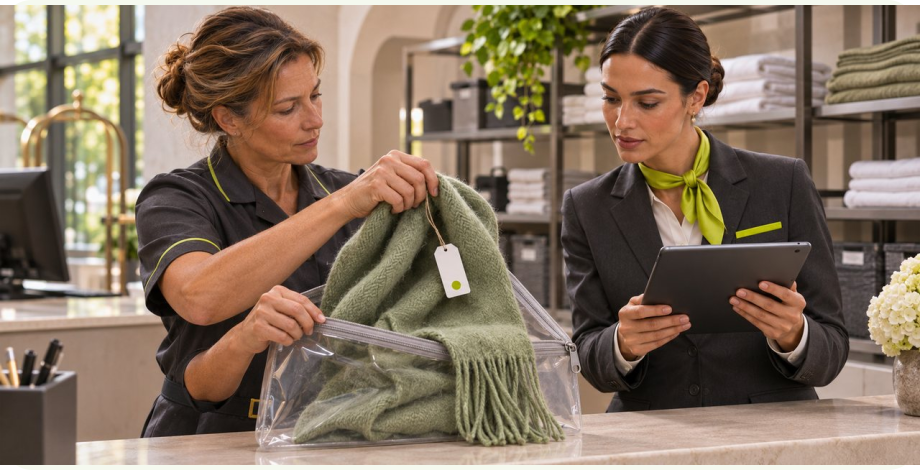
The workflow at a glance.
- 1Open the guest’s reportAsk what went missing, where it was last seen and how to reach the guest.
- 2Check the item in storageHousekeeping compares the guest’s description with the tagged item and its log.
- 3Arrange the returnAfter staff approve the match, the desk offers an available return option and records the handoff.
What should the receptionist say when a guest calls from home?
“I checked out this morning and I think I left my scarf. Can you see if you have it?” Start with the property and the last place the guest remembers seeing it. Ask them to describe it in their own words. If they also visited the breakfast room, record both places so housekeeping knows where to look. Ask how the guest would like to hear back.
Once the report is saved, a helpful reply is “I’ve logged a green scarf last seen near the window seat. Our housekeeping lead will check the room and breakfast area. Your reference is L-18.” Give the next update time only if someone on duty has agreed to cover it. If the system is unavailable, offer the staffed desk or a callback your team can actually arrange.
Evermore Orlando Resort asks guests to report the item, place and date. Its team compares the report with items turned in and contacts the guest about next steps. Your hotel can offer that first conversation by phone or website even when the person with access to storage is on another shift. Evermore’s guest FAQ.
- Guests can leave a useful description during the first call.
- Housekeeping receives the locations to check and the time someone owes a reply.
- The next shift can pick up the same report when the guest calls again.
A lost-and-found worksheet for the front desk and housekeeping
Set up these four entries in the property’s approved log. A property management system is the software staff use to manage a hotel’s rooms and stays. If housekeeping already keeps its own inventory, agree which log records each physical item. Have the receptionist send reports to that team.
- Guest report, owned by the front desk. Record the property, stay dates, last known place and time, the guest’s description, chosen contact channel, report reference, person assigned and next update due. A guest who lost something in the lobby may never have had a room number.
- Found item, owned by housekeeping. Tag each physical item separately. Record the tag number, time and exact place found, finder, description and current storage location. Keep a distinguishing feature and any inventory photo in the staff record. Let the caller describe the item before staff share identifying details.
- Match decision, owned by the designated reviewer. Link the report reference and candidate tag numbers. Record who checked the item in storage, what the guest supplied independently, whether the property’s ownership checks passed and what remains unresolved. Only the reviewer can authorize release.
- Return record, owned by the person handing it over. Record the approved recipient and return method, when the item physically left staff custody, and the pickup acknowledgement or carrier reference. If the hotel tracks delivery, record it separately when confirmed.
Clock PMS+ documents separate entries for a guest reporting something lost and an employee finding something. Its records can include the date, location, description, contact and finder. A hotel can follow the same distinction in its existing log. Clock’s housekeeping instructions.
Walk one report through a shift change
Try this fictional shift with your front desk and housekeeping lead. At noon, two green scarves are in storage. Staff tagged one from a guest room and the other from a lobby chair. At 12:15 a guest reports leaving a scarf in the room before breakfast. They say they may have carried it downstairs.
- Take the description. The guest remembers a short repair in the hem. The receptionist adds the guest’s words to report L-18 and asks whether a phone call is best. The guest has supplied a detail staff can check without reading another guest’s inventory to them.
- Check the actual items. Both tags fit the color and date. The housekeeping lead examines each scarf and finds the described repair on the lobby item. The lead records the candidate tag and applies the property’s further ownership checks. If a second person also claims it, the duty manager handles both claims privately and keeps the scarf in storage.
- Hand over the open task. At shift change, the outgoing lead gives the incoming lead the report number, item tag, decision, permitted contact and next action. If the check is incomplete, the new lead can say “We’re still checking” and agree a time to follow up.
- Record the pickup. After staff approve release, the guest elects to return that evening. The desk records “awaiting pickup” with the agreed time. The evening agent checks the recipient under the property’s policy, hands over the tagged scarf and records the collection. The other scarf stays in storage under its own tag.
What can the guest hear about pickup or shipping?
After the reviewer approves a match, staff can offer the return methods the hotel allows for that item. For pickup, confirm the desk, hours and what the collector should bring. If a guest sends someone else, route that request to the person authorized to approve a third-party collection. A case reference helps staff find a record. It does not establish who may collect the item.
For a shipment, confirm the address through the hotel’s approved process, check that the item and destination are eligible, and let the guest agree to any shipping charge through the usual payment channel. Keep card details out of calls, chat transcripts and the lost-property log. When a label is ready, say the parcel is awaiting collection. Give a shipping update after staff record carrier acceptance. If the carrier reports a delivery issue, assign a staff owner to check it with the guest.
Jonas Chorum’s manual distinguishes an item claimed and awaiting return from an item successfully delivered. It also documents a tracking-number field. Choose labels that let your staff tell a guest exactly which physical step has happened. Chorum’s lost-and-found record.
Give the duty manager four exceptions to rehearse
What can the front desk tell the guest?
- No item is logged. Housekeeping checks the last known locations and the current shift’s unlogged finds. The desk can say when staff last checked. Set the next action or close under the property’s policy and tell the guest how to follow up if new information emerges.
- Someone calls twice or uses another channel. Ask for the report reference. Verify the caller through the agreed process before sharing an update. Add the new detail to the existing report and cancel any obsolete reminder.
- The guest reports a passport, medication or another sensitive item. Offer the property’s designated duty manager promptly and use its handling instructions. Collect only what that person needs to respond. Keep document numbers, medical details, door codes, passwords and storage locations out of the conversation.
- The contact or system fails. If a message bounces, have the desk use another channel the guest agreed to. If a write to the log is uncertain, staff reconcile the queue with the log before retrying. Give unresolved reports an owner at every shift change.
Start with intake at one property
Bring your lost-property policy, a blank item log, a sample tag, your handover sheet and the contact route for each shift. Decide who may inspect inventory, verify an owner, approve a return, handle sensitive items and close an unclaimed case. Write the approved responses for “report received,” “search in progress,” “ready to collect” and “handed to carrier.”
Automate Planet can help configure a receptionist to take the missing-item report and route a summary to a staffed queue. Housekeeping can keep its present storage and tagging routine. Try the hotel front desk voice demo or explore Get started.
Once the team reliably links reports and tags, consider connecting an approved system so staff can review candidate matches, assign overdue callbacks or send a guest-approved text after the release decision. Confirm access, supported actions and any messages your software already sends before enabling an integration. For requests that come in before a stay, see the hotel pre-arrival routing guide.
Measure whether guests heard back and items reached the right hands
For one week, count the reports due an update and how many received that update by the time staff promised. Count reports still awaiting a search at shift change. Review any overdue case with the person assigned and check which location or contact detail was missing. A case that crossed into the next shift still belongs in the count.
Audit returned items separately. For each collection or shipment, trace the guest report to the item tag, reviewer, approved recipient and handoff record. Track unresolved reports and conflicting claims beside successful returns. This lets the owner distinguish missed callbacks from items that were never turned in.
Show us how your night desk hands a lost-item call to the morning housekeeper. Plan lost and found for my hotel.
Common questions
What if the guest cannot remember their room number?
Record the property, visit dates, last known locations, description and a way to contact them. The front desk can direct the search to a public area or check a stay privately under the hotel’s usual verification procedure.
Can the receptionist tell a caller which items housekeeping has found?
The receptionist can take the caller’s own description and explain the search process. Keep the inventory, identifying marks and storage locations available only to authorized staff. A reviewer checks those details before contacting the guest about a possible return.
Can the guest’s friend collect the item?
Have the desk follow the hotel’s policy for authorizing another person. Record the approved collector and the checks required at pickup. Ask a manager to resolve uncertainty before staff release the item.
What if the guest requests an update by text?
Record the guest’s chosen number and permission to receive service updates. Use the current report and approved message. Keep identifying details out of the text and route failed deliveries to the assigned employee.
How long should the hotel keep unclaimed items?
Have the property manager provide the policy that applies to the location and item category. Staff can configure a review reminder. The designated manager decides what happens to the physical item and records that action.
Can a small hotel start with a paper register?
Yes. Route each guest report to a named employee who enters it in the register and gives it a reference. Use the physical item tag to connect the report to housekeeping’s record. A later software connection can help with callbacks once the team has agreed how it records matches and returns.
Sources and editorial approach
- Evermore Orlando Resort on reporting a missing item and following up with the guest
- Clock PMS+ housekeeping instructions for recording guest reports and found items
- Jonas Chorum documentation on claimed items, return arrangements and delivery records
- Automate Planet hotel guest services and front desk voice demonstration
- Automate Planet AI receptionist services for calls and staff handoffs
How this page was prepared. AI-assisted writing based on our workflow design and the primary sources linked here. This is implementation guidance, not a report of a completed client deployment.
This is a proposed hotel procedure. The scarf example uses fictional cases. Each property sets its verification, retention and return policies. The cited software manuals describe their own products. A connection to a particular hotel’s system requires a separate access check.
hotel lost-and-found requests
Get a quote for your hotel’s lost-and-found workflow
Tell us how many properties share your desk, where you log found items and which return options your team offers guests.
Step 1 of 2 · Your services
What can we help you with?
Choose the services you’re interested in. You can select more than one.
You can close this form or start another request.