
AUTOMATE PLANET · IMPLEMENTATION NOTE · WEBSITE MIGRATION
How to Check Old Links After a Website Rebuild
Check both ends of an old link: the address someone clicks and the page they actually reach. A permanent redirect should lead directly to a relevant working page, including the intended section when one is specified. Test an unknown address too. Record these delivery checks separately from search indexing, traffic and inquiries; a working redirect does not prove those outcomes.
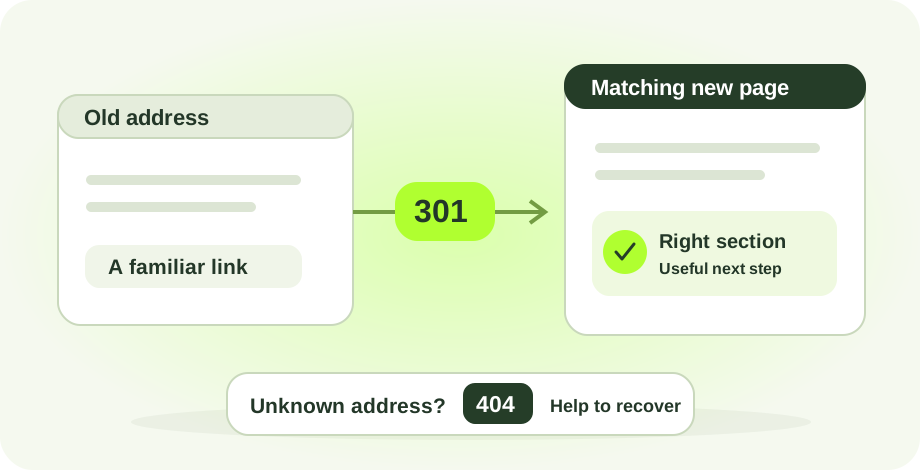
Test the journey, end to end.
- 1Old addressRecord the exact link
- 2RedirectInspect the first response
- 3DestinationCheck the page and section
- 4Next stepConfirm the visitor can continue
Start with what the old link promised
When we replaced Automate Planet’s website, old addresses still mattered because people could encounter them outside the new navigation. Our migration work included a list of old paths, relevant replacement destinations and checks for missing sections. The useful implementation lesson is that “the homepage loads” is an incomplete acceptance test for a rebuilt site.
Write down why someone would open each old address. An integrations link should reach integration information; a contact link should reach contact options. A renamed company page should reach the new company page. This gives the business owner a way to judge a redirect without needing to understand the server configuration.
Google’s site-move guidance recommends mapping old URLs to their replacements and avoiding irrelevant mass redirects to a homepage. Consolidated content can have a shared destination when it answers the old pages’ purpose. A purposeful contact-section redirect is different from sending every missing page to the top of the homepage.
What we observed on our own site
On October 26, 2026 at 9:04 AM Pacific, we checked three deliberately selected legacy addresses: a renamed about page, a contact section and an integrations section. Each address was requested with and without a trailing slash. All six initial responses were HTTP 301 and pointed directly to the expected destination. Direct requests to the three destination pages returned HTTP 200.
| Old addresses tested | Initial response | Destination | Additional check |
|---|---|---|---|
| /about and /about/ | 301 for both | /about-us/ | Page returned 200; canonical matched. |
| /contact and /contact/ | 301 for both | /#contact | Homepage returned 200; contact section ID existed. |
| /integrations and /integrations/ | 301 for both | /services/ai-client-agents/#connected | Service page returned 200; connected section ID existed. |
| /__editorial-missing-page-check-20261026__/ | 404 | Branded missing-page response | Included resource, industry and package recovery links. |
The two destination section IDs were found in the returned HTML. That is a structural check, not proof that every browser positions the section perfectly. We also checked that each destination’s declared canonical URL matched the final page address, without its section fragment.
This sample was selected to exercise different destination types. It was not random and does not establish a site-wide success rate. The unknown-address check covered one path. These observations do not establish that every historical URL, hostname, query string or browser cache behaves the same way.
A repeatable check from old address to useful page
- Capture the exact old URL. Keep its spelling, hostname and any query string from the link someone actually used. For our sample, the hostname was automateplanet.com and the selected URLs had no query strings.
- Inspect the first response without automatically following it. Record the status and destination. Our check used read-only HEAD requests for the old addresses. Following redirects immediately would conceal the first response.
- Request the destination directly. We used GET requests for the three final pages. A final 200 response confirms that the page was served; also read the page to decide whether it answers the original need.
- Check any section after the # symbol. Confirm that the destination HTML contains the matching section ID, then inspect the arrival in a browser. Our recorded sample checked the IDs; visual arrival remains a separate acceptance step.
- Try one address that should not exist. Record the actual response status as well as the visible recovery navigation. A page that says “not found” is not enough to establish a 404 response.
- Save the date, URLs and results. Recheck failed rows after a fix and keep the original observation. Do not replace a failure with a pass without recording what changed.
Google’s redirect documentation identifies 301 and 308 as permanent server-side redirects. Our sample returned 301. Record the actual response instead of describing all redirection as permanent.
Give the business owner a clear acceptance sheet
Three separate kinds of evidence.
This is an original worksheet based on our migration checks. Use one row per old address, and add the person responsible for any unresolved item. It is a proposed review method, not a claim that we tested every condition on every website.
| Check | Evidence to retain | A reason to reopen the work |
|---|---|---|
| Old link intent | Old address, original purpose and chosen replacement | The page loads but no longer answers the old request. |
| First response | Status and destination before following redirects | A missing page, loop, temporary response for a permanent move, or wrong destination. |
| Final page | Direct response, page title and content review | Another redirect, an error response or unrelated content. |
| Section links | Fragment, matching section ID and browser arrival check | The page exists but the intended section is missing or obscured. |
| Unknown address | Actual 404 response and useful recovery links | A generic success response hides the missing page. |
| Discovery | Current links, canonical URL and sitemap review | The new site still directs visitors or search engines to obsolete addresses. |
| Business outcome | Separately dated search and inquiry measurements | A redirect pass is presented as proof of traffic or sales recovery. |
For prioritization, begin with links you know people use: addresses in search reports, customer messages, directory listings and your own navigation. Expand from a sample to the complete agreed inventory before calling a migration fully checked. Keep unusual cases visible instead of hiding them inside a single completion percentage.
Keep delivery checks separate from search results
A redirect result answers “where does this request go?” It does not answer “has Google updated this listing?” or “did this visitor become a customer?” Our sample did not inspect Search Console, traffic changes, form completion or purchase outcomes. It also did not test alternate hostnames, query-string preservation, every old path or external sites linking to us.
Google’s guidance recommends direct destinations, updated internal links and canonical URLs, a current sitemap, and retaining redirects for at least a year in general. Recrawling and processing can take time. Treat the HTTP record and later search reporting as different evidence sets.
Our next-step method is to keep an issue list with the old address, expected destination, observed result, responsible person and recheck date. Fix the path first, then monitor discovery and inquiries over a defined period. The search evidence guide explains how to read visibility reports without turning impressions into customer counts.
If you are replacing a website, include the old-link inventory and acceptance sheet in the project scope alongside the new design. Explore business website services and SEO services, then choose the package for your industry. The useful buying question is which old journeys will be preserved and how the team will demonstrate that they work.
Common questions
Should every broken link redirect to the homepage?
No. Choose a relevant replacement when one exists. A contact link can lead to a contact section, but unrelated missing pages should not all be sent to a generic homepage. If there is no appropriate replacement, review how the site returns a genuine missing-page response with useful navigation.
Does a 301 response mean the migration is finished?
No. Check the destination directly, confirm its content and any linked section, and review the rest of the agreed URL inventory. Search recrawling, indexing and business outcomes require separate evidence. Our six successful source checks establish only the behavior of those tested URLs at that time.
Why test the slash and no-slash versions?
They are two address forms a visitor may encounter. In our sample both forms reached the same expected destination. That observation applies to the tested site and paths; it is not a guarantee about every hosting setup or other URL variations.
What if the page opens but the right section is missing?
Treat that as an unresolved visitor journey. A fragment such as #contact should identify a real section in the destination page. Check both the markup and the actual browser arrival; a 200 response alone does not validate the section link.
Do these checks prove that lost traffic or leads came back?
No. This is a dated delivery check of Automate Planet’s own public website. It did not measure traffic recovery, new inquiries, completed purchases or Google indexing changes. Those claims need their own records and a defined comparison period.
Sources and editorial approach
- Google Search Central: Site moves and URL changes
- Google Search Central: Redirects and Google Search
- Automate Planet: legacy integrations address used in this sample
How this page was prepared. AI-assisted writing based on documented Automate Planet work and the sources linked here. This is our implementation account, not an independent evaluation.
The October 26, 2026 observations are a small point-in-time check of our own public website. They are not a complete migration audit, a client outcome study or evidence of restored indexing, search traffic or sales. No forms, purchases or messages were submitted.
Make the next step work for your business.
Compare the scope and deliverables. Our AI can help you choose a package before you buy.
Find my packageExplore all resourcesYour next chapter.
Starts here.
Tell us what you want to make easier. We’ll help connect the right people, processes, and AI.
Make time for what’s next.
A one-hour consultation to explore your goals, workflows, and opportunities.